mAadhaar app With advancements in technology, there is no need to carry physical documents at all times. To make public services easier for citizens, the Indian Government has introduced many digital innovations, and one of them that is very helpful is the mAadhaar app. It enables the people in India to manage their own Aadhaar information using their own smartphone through the App, thanks to UIDAI, which developed the mAadhaar app.
People of India can use this app to keep there Aadhaar digitally, to update their information, to provide e-KYC, and to utilize any Aadhaar-related services anytime and anywhere in India if they want. In this post, we are going to cover all the facts about the mAadhaar app in detail.
What is mAadhaar App?
- mAadhaar app is the official app released by the UIDAI to offer the Aadhaar services online. It functions as a virtual wallet of Aadhaar which allows users to store their Aadhaar in a mobile phone rather than using an actual copy of the card.
- The features included in this app allow users to view the details of Aadhaar card, download Aadhaar card, share e-KYC, lock or unlock their biometrics, and make updates to the information available. mAadhaar app offers access to Aadhaar services in a very secure way without compromising the privacy of users.
- The mAadhaar app supports multiple Aadhaar profiles in one device.
Features of mAadhaar App
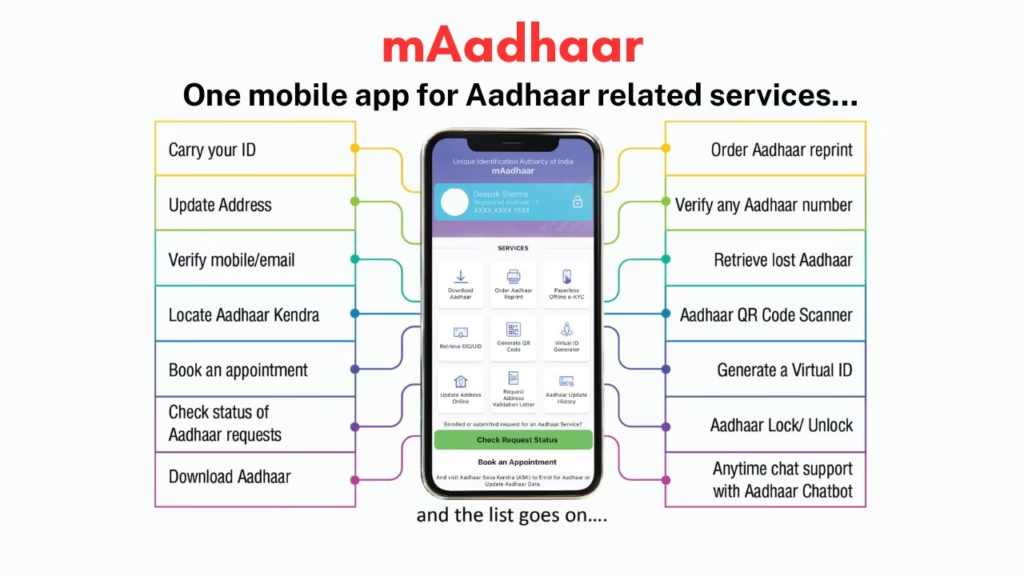
- Carry Aadhaar digitally in mobile phones.
- Download and view the e-Aadhaar at any time.
- Share details using QR Code.
- Unlock/lock biometric authentication.
- Make changes in profile information.
- Access Aadhaar service.
- Supports multiple profiles in one device.
mAadhaar App – Features Summary Table
| Features | Descriptions |
|---|---|
| Name of App | mAadhaar App |
| Development Company | UIDAI (Unique Identification Authority of India) |
| Primary Objectives | Accessing digital Aadhaar services |
| Available on Platforms | Android and iOS |
| Primary Services | Download of Aadhaar, e-KYC, Biometric Lock |
| Type of Login | Mobile OTP + Password |
| Security Mechanisms | OTP and Biometric Protection |
| Multiple Profiles Available | Yes |
Installation Procedure of mAadhaar App
Step 1: Installation
The user needs to visit the Google Play Store or Apple App Store and search for the officially released “mAadhaar” application provided by UIDAI. Users need to tap on the install option to install the app on the device.
Step 2: Create Profile in mAadhaar App
Once the app has been installed on the device, users can open it and generate a secure password. The use of password helps in safeguarding Aadhaar information from other people.
Step 3: Add Your Aadhaar Profile
Aadhaar number or QR code present on the Aadhaar card can be entered by the users to add their profile. OTP will be generated and sent to the mobile number linked to Aadhaar.
Step 4: Verify OTP Number
An OTP sent to the linked mobile number must be entered by the users. Upon completing the verification process, Aadhaar profile will be added to the app.
Step 5: Start Using the Services Available
Users can now use various services including downloading Aadhaar information, sharing QR code, biometric lock and managing Aadhaar data.
Benefits of Using mAadhaar App
- The mAadhaar application comes with a number of benefits that ensure ease of managing your Aadhaar. One of the greatest advantages is being able to carry Aadhaar digitally without carrying the physical copy around.
- Security is another important factor that you can benefit from as the app enables the user to either lock or unlock biometrics such as fingerprints or irises. In this way, there is no possibility of your Aadhaar being misused.
- A very significant advantage is that users can get easy access to services related to their Aadhaar. You can download your Aadhaar, share eKYC information, and even verify your identification using QR codes.
- The multi-profile option makes life easier for families where one smartphone can have multiple Aadhaar profiles.
Useful Services Provided through mAadhaar App
Access to Digital Aadhaar
The users are able to visualize and maintain their Aadhaar in digital form on their smart devices. Digital Aadhaar is equally accepted in all places where Aadhaar document can be shown.
Lock and Unlock of Biometrics
The application provides facility for locking or unlocking biometric authentication to keep users’ personal information secure.

Aadhaar Sharing via QR Codes/e-KYC
A user has facility of sharing Aadhaar related information for identification through QR codes/e-KYC without submission of photostats.
Multiple Profile Maintenance
Multiple profiles creation facility is available for the ease of maintaining Aadhaar related information for different family members.
Safety and Security Features of mAadhaar App
It is worth mentioning that there are strong safety and security features in mAadhaar app. It can only be accessed through password and some important operations are authenticated through OTP.
In addition, sensitive information is secured through encryption mechanism. Moreover, biometric lock feature further enhances the safety and security.
As the app belongs to UIDAI, it is highly safe as its developers follow all government standards regarding security.
Conclusion
The mAadhaar application is one of the most helpful apps that provide Indians an effective means to manage their Aadhar Card. Thanks to its various features like digital Aadhaar facility, biometric locking, e-KYC share and profile management among others, the application makes Aadhar management easier and convenient.
With India heading towards digital governance and going paperless, applications such as mAadhaar are playing an important role in helping the process become more efficient and secure.
The Indian citizen who uses Aadhaar for banking, travel, government-related services and identity authentication purposes will enjoy immense benefits out of the mAadhaar application. Not only does the app serve as a digital Aadhaar holder but is much more than that, providing Aadhar management solutions in a digital way.
Application Download Link

For More Information You Can Visit our Page
Frequently Asked Questions (FAQs)
What is the mAadhaar app?
It is a popular Aadhaar mobile application.
Who has developed mAadhaar app?
UIDAI (Unique Identification Authority of India).
Is it possible to carry digital Aadhaar through mAadhaar application?
Yes.
Is it free to use mAadhaar application?
Yes.
Can we download Aadhaar through mAadhaar app?
Yes.
Does mAadhaar app support biometric lock option?
Yes.